AI image generators can create much more than realistic photographs. With the right prompt, you can generate pencil sketches, handwritten notes, educational diagrams, watercolor paintings, 3D illustrations, stickers, posters and social media graphics.
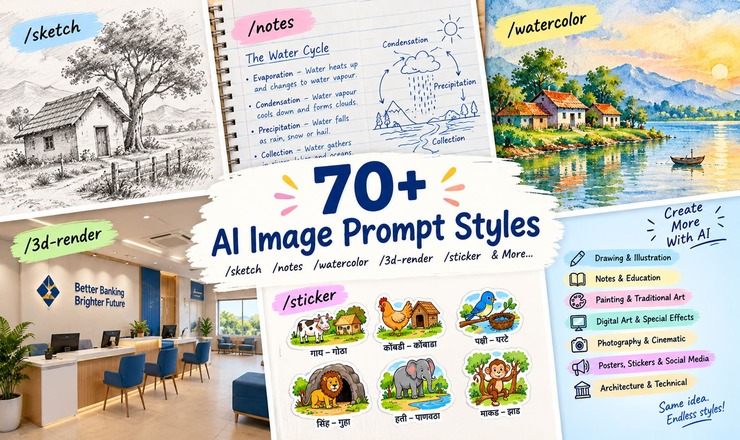
One way to organize these requests is to use short style prefixes such as /sketch, /notes, /watercolor and /infographic at the beginning of a prompt.
These prefixes act as convenient shorthand for describing the visual style you want. However, they are not universal built-in commands supported by every AI image generator. Their effect depends on how the particular tool interprets your prompt.
In this guide, we have compiled more than 70 useful image-generation prompt styles, along with explanations and examples you can copy and customize.
What Are Image Generation Prompt Styles?
A prompt style is a short instruction that tells an AI image generator how an image should look.
For example:
/sketch — creates a pencil- or ink-sketch appearance.
/notes — describes handwritten notes on notebook paper.
/watercolor — requests a traditional watercolor painting style.
/sticker — requests a sticker-like illustration with clean edges.
/infographic — asks for information arranged in a visual summary.
You can combine a style prefix with the subject, colors, layout, background and other requirements to get a more specific result.
1. Drawing and Illustration Styles
Use these prompts when you want hand-drawn artwork, character illustrations or traditional drawing effects.
Prompt style
Intended appearance
/sketch
Loose pencil or ink drawing with visible lines
/pencil
Graphite drawing with realistic shading
/line-art
Clean outlines with minimal shading
/doodle
Casual, playful hand-drawn illustrations
/cartoon
Simplified shapes and expressive characters
/comic
Bold outlines, dramatic lighting and comic-book effects
/manga
Manga-inspired linework and expressive faces
/storybook
Warm illustrations suitable for children’s stories
/chibi
Cute characters with oversized heads
/woodcut
Carved-print appearance with bold shapes and rough textures
Example prompt:
/sketch A small village house beside a tree, graphite pencil on white paper, visible pencil texture, simple shapes, no color, centered composition.
2. Handwritten Notes and Educational Styles
These styles are useful for study materials, classroom projects, tutorials, diagrams and educational social media posts.
Prompt style
Intended appearance
/notes
Handwritten study notes on notebook paper
/handwritten
Natural pen-written lettering
/mindmap
A central topic connected to branches
/flowchart
Process boxes connected with arrows
/infographic
Information organized with icons and short labels
/flashcards
Individual learning cards with clear labels
/worksheet
Educational activity sheet with instructions
/whiteboard
Explanations written on a whiteboard
/diagram
A labeled illustration explaining a concept
/chalkboard
Chalk writing and drawings on a dark board
Example prompt:
/notes Explain the water cycle using handwritten English notes, blue-ink headings, arrows, small diagrams, notebook paper and neat spacing.
These styles can be particularly useful for school assignments, exam revision notes and simplified explanations of banking, finance, science or technology topics.
3. Painting and Traditional Art Styles
Choose these prefixes when you want an image that resembles artwork made with traditional materials.
Prompt style
Intended appearance
/watercolor
Transparent color washes and soft edges
/oil-painting
Rich brushstrokes and layered colors
/acrylic
Opaque paint with strong brush marks
/gouache
Matte paint with clean shapes
/pastel
Soft, blended pigments
/ink-wash
Expressive ink tones and gradients
/collage
Layered paper, photographs and mixed materials
/paper-cut
Cut-paper shapes with layered shadows
Example prompt:
/watercolor A peaceful Indian village at sunrise, soft watercolor washes, muted green fields, warm golden light and textured white paper.
4. Digital Art and Special Effects
These styles are useful for concept art, game graphics, futuristic scenes and stylized illustrations.
Prompt style
Intended appearance
/3d-render
Three-dimensional objects and realistic shadows
/isometric
Objects viewed from an angled, geometric perspective
/pixel-art
Retro graphics made from visible pixels
/low-poly
Faceted surfaces and polygon shapes
/vector
Clean shapes and flat colors
/flat-design
Simple forms with minimal shading
/neon
Glowing lights against darker surroundings
/cyberpunk
Futuristic urban scenes and neon accents
/fantasy
Imaginative worlds and cinematic details
/retro
Vintage-inspired colors and textures
Example prompt:
/3d-render A modern bank branch interior with customer service counters, computers and comfortable seating, clean architectural design, realistic materials and soft daylight.
5. Photography and Cinematic Styles
Use these styles when you want images that resemble photographs, magazine visuals or movie scenes.
Prompt style
Intended appearance
/photorealistic
Realistic lighting, textures and materials
/portrait
Subject-focused framing and expressive faces
/product-photo
Controlled lighting for a product display
/macro
Extreme close-ups showing fine details
/film-still
Cinematic composition and color grading
/documentary
Natural, candid photographic appearance
/editorial
Magazine-style art direction
/black-and-white
Monochrome contrast and texture
/polaroid
Instant-film framing and analog texture
/miniature
Small-scale model appearance
Example prompt:
/photorealistic A cup of tea beside an open book on a wooden table, morning sunlight through a window, natural shadows, realistic surface details and a warm atmosphere.
6. Posters, Stickers and Social Media Designs
These styles are useful for blogs, Instagram posts, YouTube thumbnails, greeting cards and school-project artwork.
Prompt style
Intended appearance
/poster
Strong headline hierarchy and a central visual
/sticker
An isolated illustration with a bold outline
/sticker-sheet
Multiple separate stickers on one sheet
/logo-concept
A simple, distinctive logo idea
/album-cover
Square artwork for music releases
/book-cover
Cover composition with space for a title
/social-post
A layout designed for social media
/thumbnail
High-contrast artwork with a clear focal point
/invitation
Event details in a decorative layout
/greeting-card
Artwork for celebrations and personal messages
Example prompt:
/sticker-sheet Create separate, child-friendly stickers of a cow, hen, bird, lion and elephant, each paired with its home and a clear Marathi label, white background, no overlapping objects.
For vertical Instagram Reels or YouTube Shorts artwork, add requirements such as a 9:16 aspect ratio, readable text, a decorative border and sufficient margins.
7. Architecture and Technical Illustration Styles
These styles can help explain buildings, layouts, mechanical objects and technical processes.
Prompt style
Intended appearance
/blueprint
Technical drawing with fine lines
/architectural-sketch
Building perspectives with loose construction lines
/floor-plan
Top-down layout of rooms and spaces
/map-illustration
A stylized map with landmarks and labels
/exploded-view
Components separated to show their arrangement
/cutaway
A cross-section revealing internal structure
/technical-poster
Diagrams, captions and structured technical information
Example prompt:
/blueprint A compact two-bedroom house layout, top-down technical drawing, clearly separated rooms, doors and windows, dimension lines, white drafting lines on a dark blue background.
For technical subjects, always review the generated image for accuracy. AI-generated dimensions, diagrams and labels may be incorrect.
How to Write Better Image Generation Prompts
A style prefix is only the starting point. The rest of the prompt determines what the image contains and how the final composition should look.
Use this simple formula:
Style + Subject + Visual Details + Composition + Colors + Aspect Ratio + Text Requirements
For example:
/notes + Indian national festivals + handwritten labels and small illustrations + three separate sections + saffron, white and green accents + portrait layout + accurate English headings.
This is more descriptive than simply entering /notes.
Tips for better results
Describe the subject clearly. Specify the person, object, location or concept you want to illustrate.
Mention the visual style. Ask for pencil shading, watercolor texture, 3D rendering or another distinct appearance.
Specify the layout. Mention portrait, landscape, square, a central subject or separate sections.
Choose a color palette. Include the colors you want and describe the background.
State text requirements. Specify the exact wording, language and script.
Keep instructions consistent. Avoid mixing incompatible styles unless you deliberately want a mixed-media effect.
An important note about text in AI images
AI image generators can misspell words, especially in long paragraphs and languages using non-Latin scripts, such as Devanagari and Marathi.
For posters, educational charts and handwritten notes, keep the wording short and explicitly request the correct script. If exact spelling is essential, generate the artwork first and add the final text separately using an image editor.
Frequently Asked Questions (FAQs)
Are /sketch, /notes and /watercolor official commands?
Not universally. They are shorthand prompt labels. Some tools or workflows may assign special meaning to particular prefixes, while others treat them as ordinary text instructions.
Can I combine two prompt styles?
Yes. For example, /sketch and /notes can describe a handwritten educational page with pencil illustrations. You can also request a watercolor background with a poster layout.
Which style is best for school projects?
/sticker-sheet, /storybook, /worksheet, /notes and /infographic are useful starting points. Select the style according to whether you need labels, diagrams, handwriting or separate illustrations.
Which style is best for social media?
/poster, /social-post, /thumbnail and /sticker are useful for different formats. Add the required aspect ratio and text placement to the prompt.
Do these prefixes work in ChatGPT?
You can include them in a ChatGPT image-generation request as natural-language instructions. They are not guaranteed to activate a special mode; the descriptive details in the prompt help communicate the intended result.
Image-generation prompts become easier to manage when you group them by purpose. Use drawing styles for illustrations, /notes and /mindmap for educational material, /watercolor for traditional artwork, /photorealistic for realistic scenes and /poster for promotional graphics.
Save this list as a reference and adapt the examples to your own projects. The best results usually come from combining a clear subject with a specific visual style, layout and color palette.